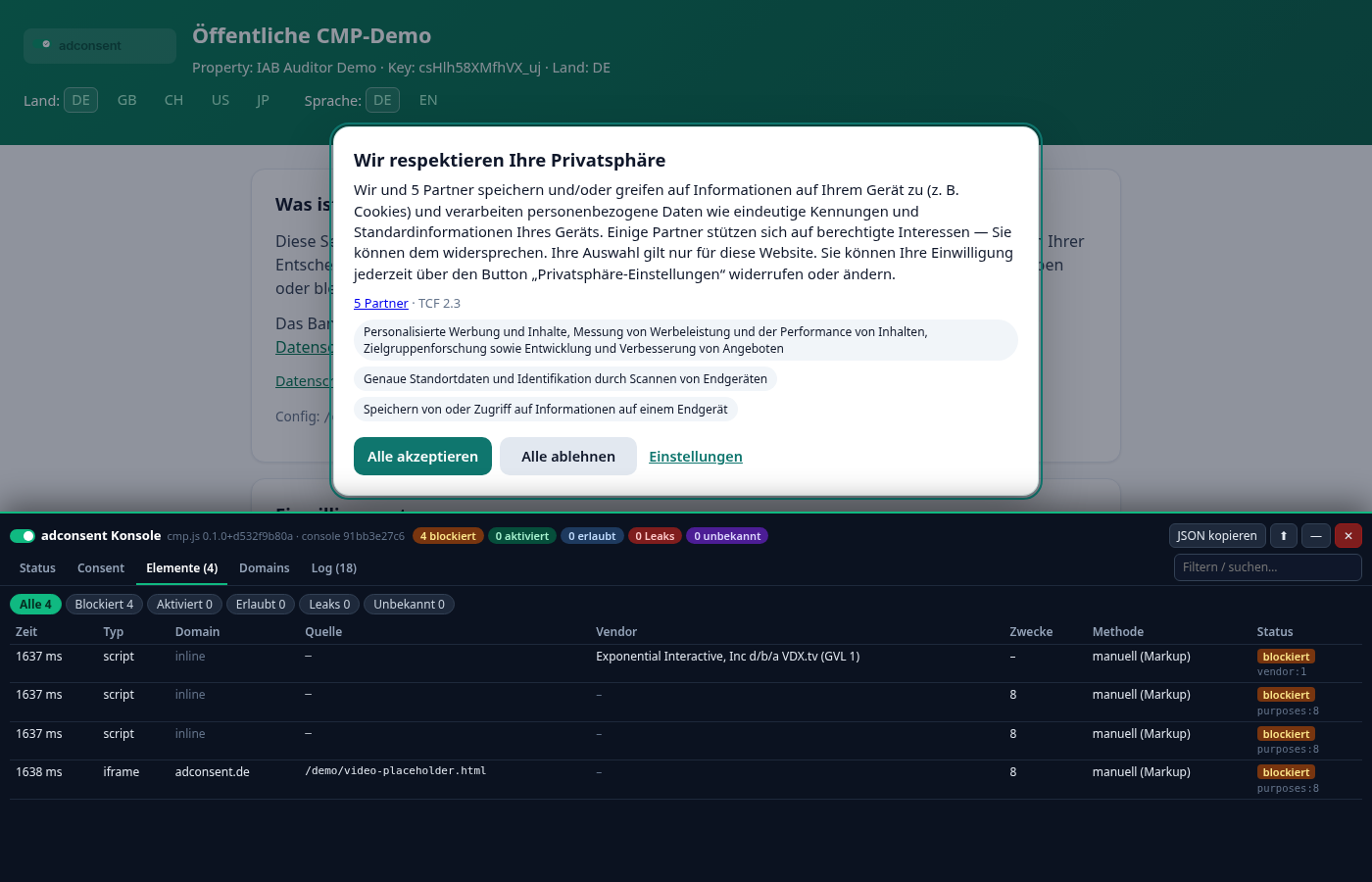
The debug console is an on-demand diagnostics panel built into cmp.js. On your own page it shows what the CMP is doing right now: which regime was detected, which consent is stored, which scripts, iframes and pixels were blocked or released after consent, which third-party domains are not yet mapped to any vendor, and every event since the page started loading (TCF events, banner, clicks, consent storage, network).
It is meant for site owners, agencies and developers to verify an integration, get tag blocking right and resolve support cases. Visitors never see it unless it is explicitly opened.
Opening the console
| Method | Example | Effect |
|---|---|---|
| URL parameter | https://your-site.com/article?cmpconsole…?foo=1&cmpconsole | Opens the console and remembers it in this browser (see flag). |
| Hash | https://your-site.com/article#cmpconsole | Same as the parameter – handy because a hash does not cause a new request or a different cache key. |
| Persistent flag | localStorage.adcmp_console = "1" | The console opens on every page of this domain until you close it. Set automatically by the two methods above. |
| JavaScript API | cmp.console() | Opens the console immediately and also sets the flag. Available as soon as cmp.js has loaded – even if the configuration failed to load. Before that, via the queue: cmp.q.push(["console"]). |
The parameter also accepts a value, e.g. ?cmpconsole=1. The console is a separate script (/cmp/v1/cmp-console.js) that is only fetched when opened – cmp.js itself barely grows.
cmp.js runs, so events that happened before you opened the console are included.Closing and disabling
- ✕ (top right) closes the console and removes the
adcmp_consoleflag – it is gone on the next page view. cmp.console(false)(orcmp.console("close")) – the same from JavaScript.?cmpconsole=0or#cmpconsole=off– does not open it and clears the flag (useful in a link for colleagues).localStorage.removeItem("adcmp_console")– manually.- — minimises the console to a small pill with counters (stays active), ⬆/⬇ docks it at the top or bottom. Drag the top edge to resize; height and position are remembered.
Layout
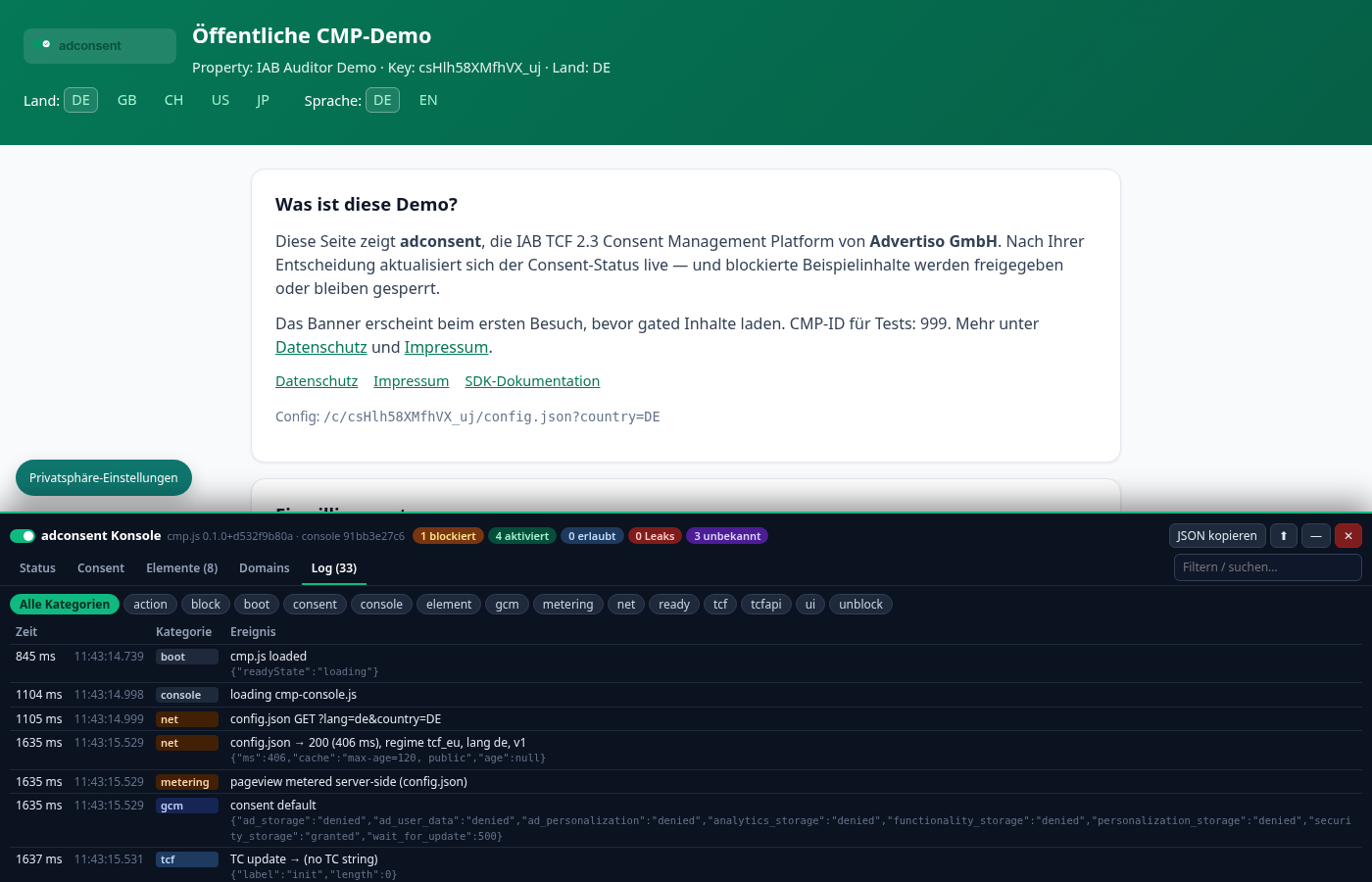
Header: cmp.js and console versions, count badges (click to filter the element list), Copy JSON, dock, minimise, close. Below: five tabs and a search box that filters every tab (domain, URL, vendor, log text …). While open, the console reserves space at the bottom (or top) so the consent banner and the “privacy settings” button stay usable. On phones, tables are shown as cards.
| Badge | Meaning |
|---|---|
| blocked | Held back by the CMP (no consent for the vendor/purpose). |
| activated | Was blocked and has been released after consent (with timestamp). |
| allowed | Mapped to a vendor that already had consent – loaded immediately. |
| leaks | Mapped to a vendor without consent but loaded anyway (e.g. included before the CMP, or an <img> pixel). Should be 0. |
| unknown | Third-party element whose domain matches no vendor – not blocked. |
“Status” tab
- CMP: SDK version, CMP ID, CMP version, whether
__tcfapi, the__tcfapiLocatorframe and__gppexist,cmpStatus/displayStatusfromping, TCF policy and GVL version, whether the CMP is ready and whether the banner is visible. - Property / configuration: property key, API base, config version and publish time, page, publisher country, number of GVL vendors / custom vendors / purposes.
- Regime & region: detected regime (
tcf_euGDPR,tcf_uk,ch,gpp_usUS opt-out,notice_only,none), detected country, enabled regimes, language,gdprAppliesand whether the browser sends GPC (Global Privacy Control). - Timings (ms since navigation start): DOMContentLoaded,
cmp.jsloaded,config.jsonloaded, CMP ready, banner shown, consent saved, load event. - Blocker: whether the auto-block hooks are active, counters and any dropped old entries (buffer: 500 events / 600 elements).
- Google Consent Mode v2: every signal (
ad_storage,ad_user_data,ad_personalization,analytics_storage…) with its default and latest update value from thedataLayer, plus the call order.
“Consent” tab
- Decision: none yet / accepted all / partial / declined, timestamp, consent ID (for records and support) and maximum validity.
- Purposes (IAB TCF 1–11) with consent and legitimate interest, special features (precise geolocation, device scanning), GVL vendors with consent, legitimate interest and purposes, custom vendors with domains, purposes and opt-in.
- TC string raw and decoded (version, created/updated, CMP ID, consent screen, language, GVL/policy version, publisher country, consented purposes and vendors) – directly comparable with tools such as the IAB TC string decoder.
- GPP string (US regime only).
“Elements” tab
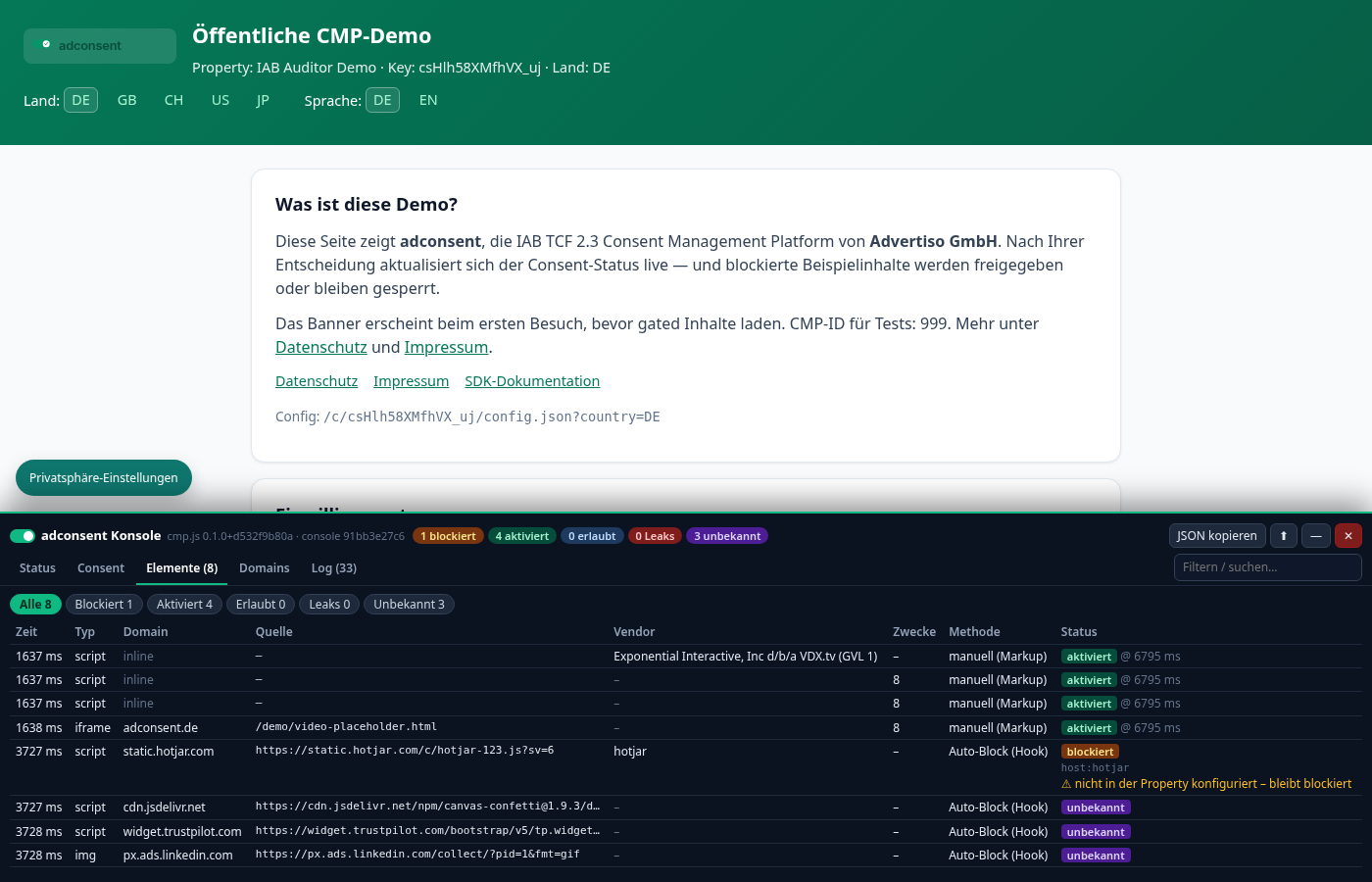
Every third-party script, iframe, image and stylesheet the CMP has seen. Filter chips (All / Blocked / Activated / Allowed / Leaks / Unknown) and the search box narrow the list.
| Column | Meaning |
|---|---|
| Time | When the CMP first saw the element (ms since navigation start). |
| Type | script, iframe, img, link. |
| Domain | Host of the source; inline for inline scripts without src. |
| Source | Full URL (src, data-cmp-src or href). |
| Vendor | Matched vendor: IAB vendor with name and GVL ID (from data-cmp-vendor or domain mapping) or custom vendor (from data-cmp-custom or its domains). |
| Purposes | From data-cmp-purposes, if set. |
| Method |
manual (markup) – marked by the site owner: type="text/plain" with data-cmp-vendor/data-cmp-custom/data-cmp-purposes, or <iframe data-cmp-src>. The most reliable method.auto-block (hook) – inserted dynamically via JavaScript ( appendChild/insertBefore) and intercepted automatically by domain, without markup changes.observer (bypassed hook) – inserted via innerHTML/the parser and only seen by the MutationObserver after insertion; for scripts the request may already have started.in DOM before CMP – present in the HTML before cmp.js or already loaded when the CMP started; cannot be stopped any more.
|
| State | blocked, activated @ 4265 ms (release time), allowed, not blocked or unknown. Below it the reason, e.g. vendor:755, custom:youtube, purposes:8, host:hotjar. Warning “not configured in property – stays blocked”: see troubleshooting. |
“Domains” tab
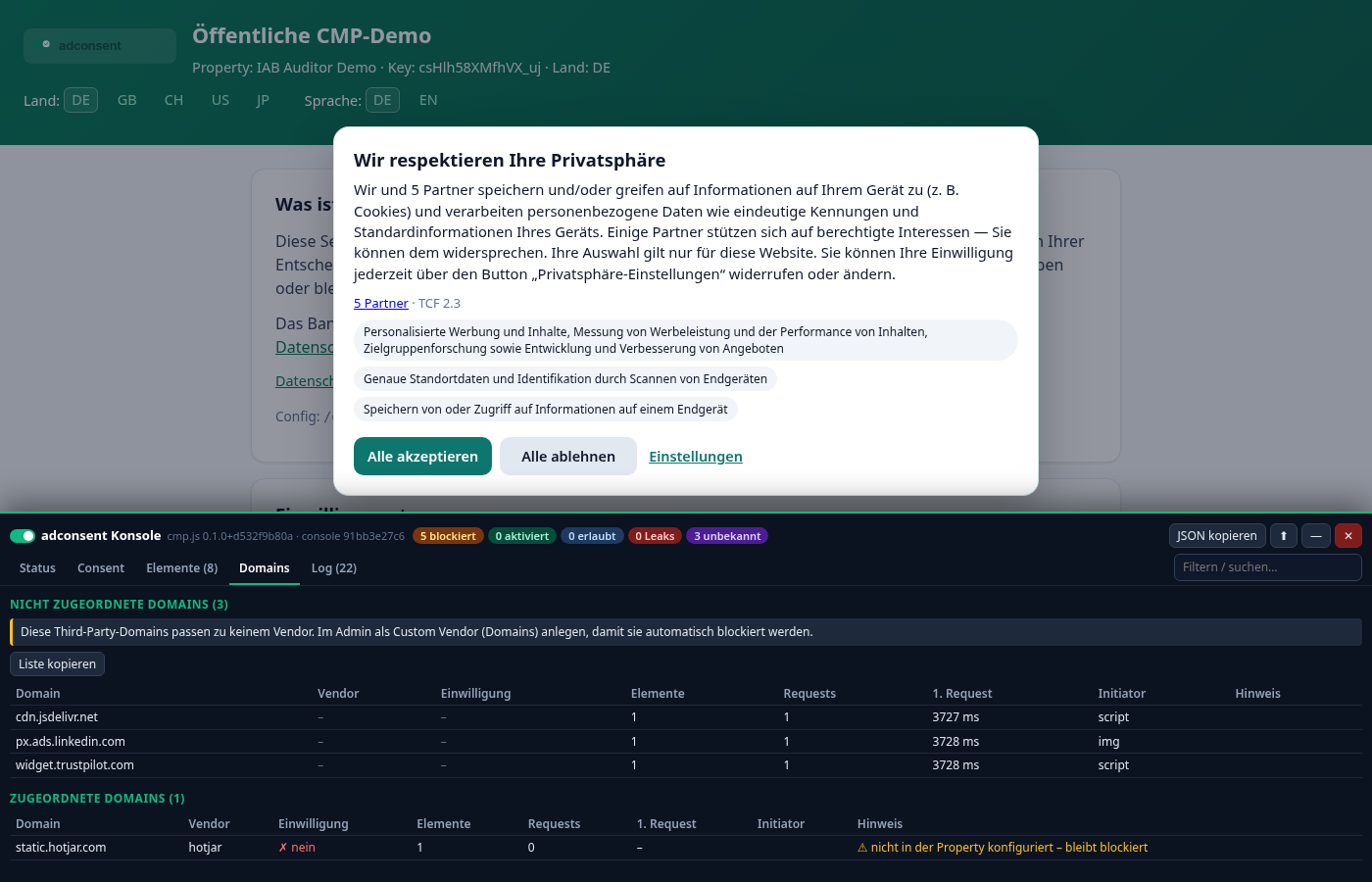
Aggregates elements and all resources actually loaded (Resource Timing – including requests that scripts fire themselves via fetch/XHR/pixels) per domain. Your own domain and the CMP domain are hidden.
- Unmatched domains (top): third-party domains that match no vendor and are therefore not blocked. Copy list gives you all hosts, one per line.
- Mapped domains: with vendor, consent state, number of elements and requests, time of first request and initiator (script, img, iframe, fetch …). The note “requested before/without consent” flags vendors whose domain was requested without consent or before consent was given.
Adding an unknown domain as a custom vendor
- In the admin, open Custom Vendors → New (“Neu”).
- Enter a key (e.g.
hotjar), name and privacy policy URL, paste the copied hosts into Domains (one per line;example.comalso covers subdomains such ascdn.example.com), add cookie names/patterns and purposes (functional,statistics,marketingor IAB IDs), choose the legal basis and click Anlegen (create). - In the property under Settings → “Custom Vendors dieser Property” (custom vendors of this property), tick the vendor and save.
- Reload the page with
?cmpconsolein a private window (the public config is cached for up to 2 minutes): the elements now show as blocked with method auto-block (hook), and the vendor is listed in the banner.
IAB vendors don't need a custom vendor: mark the tag with data-cmp-vendor="GVL-ID" and add the vendor to the property's vendor selection.
“Log” tab
Chronological log from the moment cmp.js loaded, with relative time (ms) and clock time. Filter categories with the chips; details (JSON) are shown below each message.
| Category | Examples |
|---|---|
boot | cmp.js loaded (with document.readyState) |
console | console is being loaded |
net | config.json GET, config.json → 200 (313 ms), regime tcf_eu, lang de, v1, consent log POST → 201 (85 ms) |
metering | the page view is counted server-side when config.json is loaded (basis for billing; bots/prefetch excluded) |
gcm | Google Consent Mode consent default / consent update with all signals |
tcf | TC string update with eventStatus: tcloaded, cmpuishown, useractioncomplete |
tcfapi | calls from other scripts to __tcfapi (e.g. addEventListener, getTCData, ping) – shows which ad tags query the CMP |
gpp | __gpp installed, GPC detected, US opt-out set/cleared |
consent | banner required: no stored consent (or new config version, expired …), stored consent valid → no banner, consent saved: 11 purposes, 5 vendors, 2 custom |
ready | CMP ready |
ui | banner shown (layer 1/2) / hidden, clicks on accept, reject, settings, save selection |
action | API calls cmp.consentAll(), cmp.declineAll(), cmp.show() |
block / unblock / element | element blocked / activated after consent / allowed, unknown or not blocked |
cookies | cookies of declined vendors deleted (patterns) |
error | config errors, missing property key, failed consent log, console could not load |
Copy JSON
Copy JSON puts a complete snapshot on the clipboard: page, SDK version, property, regime, country, language, consent state including TC and GPP strings, counters, all elements and all events with absolute timestamps. Ideal for support requests – just send it to support. __adcmpConsole.snapshot() in the browser console returns the same snapshot.
Troubleshooting
A script loads before consent
- State not blocked with method in DOM before CMP: the tag sits in the HTML before
cmp.js. Includestub.js/cmp.jsfirst in<head>, or mark the tag manually (type="text/plain"+data-cmp-vendor/data-cmp-custom). - Method observer (bypassed hook): the tag was inserted via
innerHTMLordocument.write. Switch to manual markup. - Type
img: pixel requests start as soon assrcis assigned. Create the pixel from a blocked<script type="text/plain" data-cmp-vendor="…">. - State unknown: the domain is not mapped to any vendor – see next section.
- “requested before/without consent” in the Domains tab but no element in the list: the request was fired by another (allowed or unknown) script itself, e.g. via
fetch. Block the originating script (the Initiator column gives a hint).
A script stays blocked despite consent
- Warning “not configured in property – stays blocked”: the domain is on the built-in tracker list (e.g. Hotjar, YouTube, Google Maps) but the vendor is not part of your property, so visitors cannot consent to it. Create it as a custom vendor or tick it in the property settings (how to) – it then appears in the banner and is released after consent.
- Reason
purposes:…: consent is missing for at least one purpose listed indata-cmp-purposes. - Check the Consent tab to see whether the vendor really has consent (e.g. only partially accepted).
A domain shows as unknown
- It matches neither a custom vendor of the property nor the built-in tracker list. Create a custom vendor (how to) or mark the tag with
data-cmp-vendor. - Non-critical domains (your own CDN, fonts you consider strictly necessary) may stay unknown – they are not blocked.
- Still unknown after adding it? Is the vendor ticked in the property settings? Wait up to 2 minutes for the cache, use a private window, check the domain spelling (no
https://, no path).
The console does not appear
- Is
cmp.jsloaded? Nocmp.js, no console. Look forcmp-console.jsin the browser devtools network tab. - A Content Security Policy must allow scripts from the CMP domain (as for
cmp.js). - Some sites strip query parameters with a redirect – use
#cmpconsoleorcmp.console()instead.
No banner / status “not initialised yet”
Look for error and config.json → … in the log: 404 = wrong property key or no published configuration; regime none = no banner configured for this country.
Technical notes & privacy
cmp.jsonly keeps a small in-memory ring buffer (max. 500 events, 600 elements). Nothing is sent or persisted; only theadcmp_consoleflag (plus the console's height/dock position) is stored inlocalStoragewhen you open the console.- The console is fetched from the CMP domain only when opened (
/cmp/v1/cmp-console.js, versioned), renders inside a shadow DOM (no style conflicts with your page) and displays all page content as plain text. - It never changes consent or blocks anything – it only observes. Its own API queries do not appear in the log.
- Globals:
window.__adcmpDebug(buffer),window.__adcmpConsole(open(),close(),refresh(),snapshot()).